
1688.com is a major Chinese online wholesale marketplace owned by Alibaba Group. It serves as a platform for businesses to source products directly from manufacturers and suppliers in China, offering a wide variety of goods at competitive prices. Whether you are a small retailer looking to stock up on inventory or a larger business seeking bulk purchases, 1688.com provides a comprehensive solution for all your sourcing needs.
When your 1688.com account is successfully registered and you have purchased your favorite products, the next step is to place an order and pay.
Here’s a comprehensive guide to help you navigate this process:
How to Place an Order on 1688.com
After selecting the product you want to purchase, follow these steps:
- Order Now: Click on “Order Now” (立即订购) to proceed directly to the payment page.
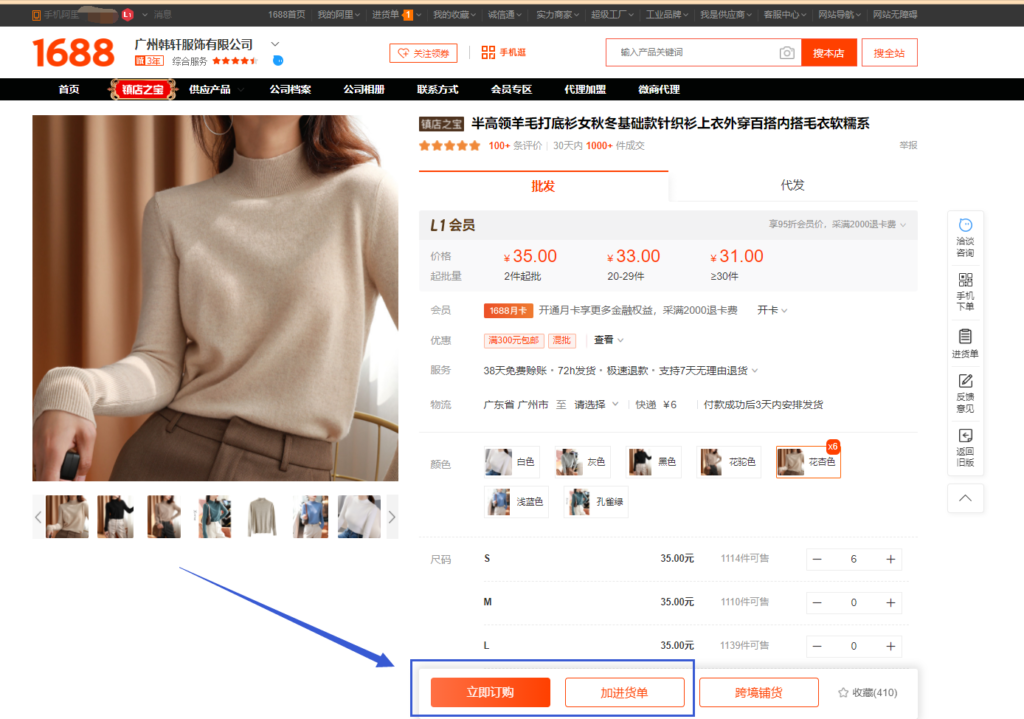

2. Add to Receipt: If you wish to continue shopping, click “Add to Receipt” (加进货单) to add the item to your shopping cart and pay with other orders later.
3. Purchase Order: Go to the homepage of 1688.com and click “Purchase Order” (进货单). This will direct you to a page where you can click “Settlement” (结算) to enter the payment page.
Now, let’s explore the payment options available on 1688.com.
Five Ways to Pay on 1688.com
1. Direct Payment Using Alipay
Paying via Alipay is the most straightforward and cost-effective method if you have an Alipay account linked to a Chinese bank account.
- Switch to the Overseas Version: On the payment page, switch to the “Overseas Version”.
- Balance Payment: Use the balance in your Alipay account.
- Bank Card Payment: Pay using a mainland China bank card linked to your Alipay account.
To enable the balance function of Alipay, you need to verify your account using a Chinese mainland bank card, which requires a visit to China to open a bank account in person.
2. Bank Transfer
Bank transfer is suitable for large-amount transactions or if you don’t have an Alipay account. Here’s how to do it:
- Bank Transfer: Click “Bank Transfer” (银行转账) on the payment page and then “Submit Order” (提交订单).
- Corporate Transfer: Alternatively, select “Corporate Transfer” (对公转账) to transfer funds directly to a corporate Alipay or bank account.
Use your bank card to transfer funds to the provided accounts via Mobile Banking App, PC Internet Banking, or a bank counter.
3. Use Alipay’s “Find Someone to Pay” Function
You can ask a friend with an Alipay account to pay on your behalf:
- Find Someone to Pay: Select “Find someone to pay on your behalf” (找人代付) on the Alipay payment page.
- Fill in Details: Enter your friend’s Alipay or Taobao account and the check code, then click “Ask him to pay” (请他付款).
Note: This function can only be used for single orders and allows up to 10 transactions per day.
4. AliPrice.com Payment
If you don’t have an Alipay account or a friend to help, use AliPrice.com’s payment service:
- Order Amount: Check the order amount on 1688.com and submit your order.
- Payment Link: On the Alipay payment page, select “Find someone to pay on your behalf” and obtain the payment link. Reach out at info@sourceguy.com as the friend’s account.
- Submit Payment Application: Copy the payment link and go to sourceguy.com to enter the amount and submit the order.
SourceGuy will handle the payment for you.
5. 1688 Cross-Border Pay
1688 Cross-border Payment (跨境宝) allows foreign companies to pay suppliers directly through their Alipay and 1688 accounts.
- Cross-Border Pay Application: Start the application process on 1688 Cross-Border Pay.
This official solution offers low fees and secure transactions.
Conclusion
These are the methods to order and pay on 1688.com. For overseas users without a Chinese bank card or Alipay account, services like SourceGuy offer a convenient solution. For more details on SourceGuy’s payment service, reach out at info@sourceguy.com
